GeForce RTX 3060 Ti DLSS 5 compatibility: current status
The GeForce RTX 3060 Ti is absent from NVIDIA’s DLSS 5 launch support list. The launch material does not include it, and no later driver or SDK release has added the card. Developers, technical artists, and players should plan around that published status rather than unannounced dates or invented benchmarks.
Compatibility spans three separate layers: the GPU feature set, the DLSS SDK built into the game, and the driver path that exposes profiles to that SDK. Mixing those layers produces bad support claims. Keep them separate when testing a build or reading a specification.
The RTX 3060 Ti hardware that matters for DLSS
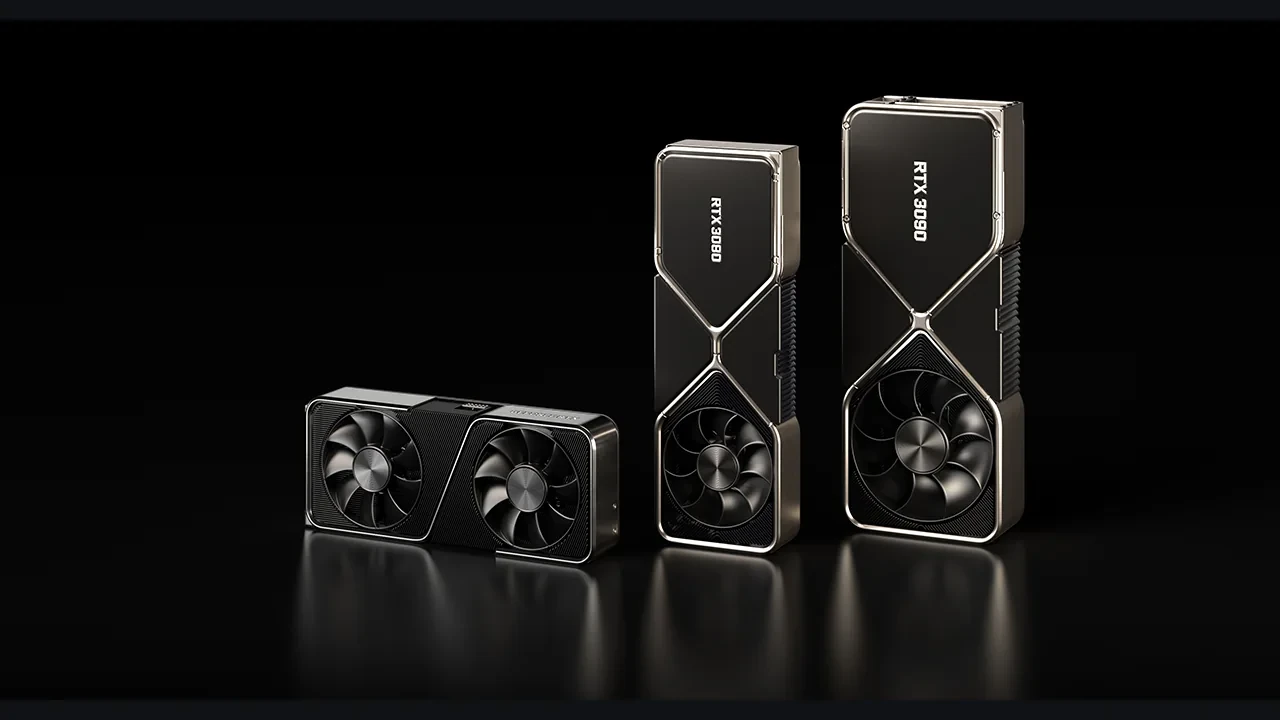
The GeForce RTX 3060 Ti is a desktop Ampere card from the RTX 30 series. It has 8 GB of GDDR6, second-generation Tensor Cores, and hardware-accelerated ray tracing. NVIDIA positioned it as a strong 1080p card with useful 1440p headroom. In shipped games, it combines solid rasterization with moderate-setting ray tracing and tends to work well with DLSS at the resolutions where upscaling has the most room to help.
The RTX 30 line launched with DLSS 2.x as its standard upscaler. Later driver and SDK work extended DLSS 3 Frame Generation and DLSS 3.5 Ray Reconstruction across most of the lineup. That history explains why developers evaluate each new release on the 3060 Ti, but it does not erase the difference between hardware capability and official support. The GeForce 30 series on Wikipedia provides a neutral reference for the desktop lineup, VRAM capacities, and release windows.
How NVIDIA gates DLSS versions
DLSS is a family of techniques rather than one fixed algorithm. A generation may change the neural network, training data, runtime requirements, or some combination of them. Each release arrives with an SDK, model files loaded by the engine, and a driver path that exposes features such as optical-flow acceleration when the GPU provides them.
Raw speed does not decide compatibility. The DLSS SDK used by the game must accept the installed GPU as a valid target. If a card is outside the runtime allow list, the title may fall back to an older path, disable the menu item, or reject the request. Which behavior appears depends on the game’s menu and startup code.
The gate exists because a new model may need different compute behavior, more memory, or a hardware feature absent from an older card. NVIDIA does not automatically release every version on every RTX product, even if the silicon looks capable on paper. The launch support list is the contract. A missing card remains unsupported until NVIDIA revises that list.
Official support on the RTX 3060 Ti today
Published material validates the GeForce RTX 3060 Ti for DLSS 4.5 Super Resolution and Ray Reconstruction, the latest supported DLSS generation for this product line. A current DLSS 4.5 integration should run with the expected quality and stability profile. The card also supports DLSS 3 Frame Generation in titles that expose it. News of a newer version does not remove any of those existing features.
NVIDIA’s DLSS 5 launch and compatibility research page is the authority for launch support. Treat any FPS figure, model size, or GPU list absent from that page as unverified until NVIDIA publishes it.
Why capable hardware may remain unsupported
The 3060 Ti uses the same Tensor Core generation as the rest of the RTX 30 family. It also has enough bandwidth to load a DLSS model and enough throughput for the workloads DLSS normally runs. Nothing obvious in a paper specification proves that it cannot execute the same path as a faster RTX 30 card. Still, that is not the same as validation.
NVIDIA must certify model output on the target SKUs, and launch hardware gets that work first. The driver must also expose the correct entry points, allocate memory, and sometimes reserve hardware blocks. SKUs within a family are not always wired identically. A new model may prefer more VRAM or depend on a runtime feature the card lacks. NVIDIA resolves those trade-offs in the support list, not in theoretical throughput comparisons.
How a new version reaches shipping games
A DLSS release moves through a sequence of public and production steps. A card missing from the first step cannot safely be assumed to reach the last.
- Initial launch list: NVIDIA publishes day-one GPU support alongside the SDK and model files.
- Driver rollout: Studio and Game Ready drivers expose the path on supported GPUs first, sometimes on a staggered schedule.
- SDK adoption: Engine and middleware vendors integrate the SDK and ship updated binaries before games can show the option.
- Backfill reviews: NVIDIA may extend support after more validation, customer demand, and maturation of the model and driver stack.
- End of active support: Eventually, a card remains on the last DLSS version validated for it.
The 3060 Ti currently sits on the DLSS 4.5 list but outside the DLSS 5 launch list. NVIDIA alone can answer whether it will be added later. I would not build a schedule around either outcome.
How developers should integrate DLSS now
Pin the project to an SDK version that explicitly supports the GPUs in the QA matrix. The runtime allow list should be the authority, not a hand-maintained list in menu code. The options UI also needs to degrade cleanly when a player’s card supports an older version but not the newest one.
A durable integration uses the following pattern.
- Query the DLSS SDK for the newest version exposed by the current driver and active GPU before building the options menu.
- Associate each menu item with its DLSS version and disable any entry refused by the runtime instead of hiding it behind custom assumptions.
- Keep the project on an SDK validated by QA, then update it deliberately when the support matrix expands.
- Match patch-note compatibility claims to the SDK allow list rather than broad marketing language.
This avoids two common support problems: offering a feature the runtime rejects, or silently falling back to a path different from the one the player selected.
Engine checks for technical artists
In Unreal Engine or a custom engine, start by confirming that the installed DLSS plugin matches the SDK version planned for release. A mismatch can make supported hardware appear unsupported because the engine asks the driver for a path it cannot resolve. Then check which settings are enabled in the post-process volume and which DLSS features appear in the scalability configuration.
Profile the resolution scale used by Quality, Balanced, and Performance modes. The 3060 Ti’s 8 GB of VRAM and memory bandwidth suit default DLSS modes at 1080p and 1440p. Pushing Performance mode at 4K is more likely to expose a memory or bandwidth bottleneck before a compatibility problem. Support and speed need separate validation passes.
Frame Generation also carries latency overhead and a small memory cost. On a 3060 Ti, the trade is usually favorable around a 60 Hz target and less attractive when the base frame rate already approaches the panel’s refresh ceiling. It is measurable, not free.
What RTX 3060 Ti owners should do now
Keep the GPU driver and game client current, then check what the title exposes in its own menu. The card is fully supported for DLSS 4.5 Super Resolution and Ray Reconstruction, plus DLSS 3 Frame Generation where the game offers it. Those features remain the practical performance base for current releases on this GPU.
Be wary of third-party lists that declare DLSS 5 support before NVIDIA does. A utility can detect a DLL on disk, but that says nothing about model and runtime validation for a particular SKU. Wait for a driver and SDK release that names the 3060 Ti, or for patch notes from a shipping title that explicitly list the card.
How to judge a compatibility claim
A strong claim names the GPU list, driver version, and SDK version. A weak one paraphrases marketing copy or cites an unpublished internal test. If one of those identifying pieces is missing, treat the result as a rumor rather than release guidance.
Official support includes the named driver, SDK, and GPU list. Capability guesses, leaks, and third-party tests remain unverified. Community DLL swaps and workarounds belong in a separate category because they do not carry the same support promise.
For now, the 3060 Ti belongs in the unverified DLSS 5 category. It may be a plausible backfill candidate, but no driver or SDK update has changed its launch-list status.
| Claim type | What it usually contains | What it usually does not contain | How to treat it |
|---|---|---|---|
| Official launch support | GPU list, driver version, SDK version, day-one date | Per-title caveats | Source of truth |
| Backfill announcement | Target SKUs, expected driver window | Per-title integration timeline | Plausible, but wait for the driver |
| Community report | Driver version, OS version, observed behavior | Model validation, regression coverage | Useful signal, not a guarantee |
| Marketing recap | General feature description | GPU list, driver version | Editorial context, not a compatibility claim |
What changes between DLSS 4.5 and DLSS 5 for developers
The main production difference is the integration contract, not a headline image comparison. A new DLSS version typically brings a new SDK surface, model-file format, set of runtime options, and sometimes a higher minimum driver. Existing integrations need a rebuild against that SDK and another pass through the QA matrix, even when the visual change is modest.
Treating the move from 4.5 to 5 as a model swap is a common mistake. The SDK may change feature queries, menu options, and runtime status reporting. Engine code written for 4.5 can otherwise advertise a feature that the 5 runtime refuses to enable.
If a production build has not reached DLSS 4.5 yet, finish that work first. The 3060 Ti benefits from it immediately, and the studio gains a shipping feature instead of waiting on an unresolved compatibility update.
| Integration area | DLSS 4.5 (current supported on 3060 Ti) | DLSS 5 (not officially supported on 3060 Ti) |
|---|---|---|
| Runtime query path | Stable API, broad engine support | New API, new engine integration work |
| Model file | Shipped with current SDK | Shipped with new SDK only |
| Driver dependency | Widely deployed | Initial driver rollout in progress |
| QA matrix impact | Already validated for most 30 series cards | Validation pending for most 30 series cards |
| Player-facing option text | Mature, documented | Subject to change in early lifecycle |
Plans for each development phase
A prototype, vertical slice, production build, and live title carry different levels of compatibility risk.
- Prototype: choose the DLSS path most likely to ship, test a representative low-end GPU, and treat the 3060 Ti as a possible rather than guaranteed target for the next major version.
- Vertical slice: build against the current SDK, run the RTX 30 QA matrix, and record the DLSS version used by every title so later upgrades have a baseline.
- Production build: pin the SDK, show version-aware menu options, and add a CI check that catches drift from the validated SDK.
- Live service: follow the SDK lifecycle, schedule upgrades around content drops, and copy the SDK allow list into patch-note compatibility guidance.
At every stage, avoid promising a version the runtime refuses on hardware included in the shipping specification.
How the 3060 Ti compares with other RTX 30 cards
The RTX 3070, 3080, and 3090 share the 3060 Ti’s Tensor Core generation and driver path. New DLSS launch lists often group those higher-tier cards together. The RTX 3060 and 3050 occupy the lower end of the family and have historically joined new DLSS versions later, after model footprint and runtime tuning for smaller memory budgets.
A missing RTX 30 card may therefore be a backfill candidate rather than a permanent exclusion. The 3060 Ti has enough VRAM and memory bandwidth for most DLSS workloads, which keeps the question open. It does not turn that possibility into support.
Events that would change the answer
A Studio or Game Ready driver adding the 3060 Ti to the supported list would change its status. So would an SDK release that includes the card in its allow list and reaches an engine plugin, or a shipping DLSS 5 game whose known-support list names the 3060 Ti. None has happened at the time of writing.
A leaked driver, early-access benchmark, community mod, hidden option, or marketing slide without a GPU list would not change the answer. Those items may be signals, but they are not official support.
Compatibility mistakes worth avoiding
- Do not equate “fast enough” with “supported.” Only the latter is a compatibility claim.
- Do not infer 3060 Ti support because an RTX 3080 appears on a list. Family membership does not guarantee identical eligibility.
- Do not treat a local model file as proof. Drivers and engines may bundle files for GPUs they do not enable.
- Do not read day-one support as a promise of backfill. Later support remains open until NVIDIA announces it.
- Do not combine Super Resolution, Frame Generation, and Ray Reconstruction into one status. They are separate features with separate timelines.
Internal project documentation should record the SDK, driver, engine version, and GPU list in one compatibility matrix. A claim missing any of those four fields is incomplete.
Signals to watch in the next driver cycle
Look for a Studio or Game Ready release-notes page that lists DLSS 5 GPUs, an SDK update that adds the 3060 Ti to its allow list, or shipping-game patch notes that name the card in a DLSS 5 context. Any one could move the status from “not officially supported” to “supported as of version X.”
Until then, the published position is straightforward: the GeForce RTX 3060 Ti supports DLSS 4.5, is absent from the DLSS 5 launch list, and may or may not receive later support.
A workflow that does not depend on future support
Ship the SDK version validated for the card now. Expose DLSS 4.5 Super Resolution and Ray Reconstruction wherever the 3060 Ti belongs in the QA matrix, and do not advertise a feature the runtime rejects. The longer-term DLSS 5 question can remain open without blocking the current build.
The RTX 3060 Ti has aged well. Keeping it useful means using its supported DLSS features today and making the integration ready for a newer version only if NVIDIA eventually adds the GPU.
Frequently asked questions
Does the GeForce RTX 3060 Ti support DLSS 5?
No official DLSS 5 support has been announced. The card is not on the published launch list, so contrary claims remain rumors until NVIDIA names it in a driver, SDK update, or official GPU list.
Which DLSS versions does the RTX 3060 Ti officially support today?
It supports DLSS Super Resolution, DLSS 4.5 Ray Reconstruction, and DLSS 3 Frame Generation in titles that expose the option. Developers can rely on those features when targeting the card.
Will DLSS 5 ever be backfilled to the 3060 Ti?
Possibly, but NVIDIA has not confirmed it. The company sometimes expands support after launch, and the 3060 Ti’s hardware makes it a reasonable candidate. That remains speculation until a driver or SDK adds it.
Why is the 3060 Ti missing from the DLSS 5 launch list?
NVIDIA’s public material does not give a reason. Launch lists generally reflect which GPUs have completed validation for the new model and runtime, often with priority given to products expected to lead adoption. A card outside the list is not validated for that version yet, regardless of raw capability.
Should a developer still integrate DLSS 5 in a game that targets the 3060 Ti?
Yes, provided the engine queries support at runtime. Eligible GPUs can receive DLSS 5 while the 3060 Ti sees its supported DLSS 4.5 path. Build the options menu from the runtime allow list rather than a static assumption.
Will a leaked or modded DLSS 5 DLL enable DLSS 5 on the 3060 Ti?
A DLL on disk does not create a supported runtime path. The driver, SDK, engine, and model must all agree. A missing piece can disable the feature or produce incorrect output. Safe support requires an official driver and SDK release that lists the card.
How does DLSS 5 differ from DLSS 4.5 for a working developer?
The integration contract changes. A new version usually means a new SDK API, model file, option set, and minimum driver. Rebuild against the SDK and run the full QA matrix even if the visible image change looks incremental.
Is the 3060 Ti a good card for DLSS at 1080p and 1440p?
Yes. Its memory bandwidth, 8 GB of VRAM, and Tensor Core generation run Super Resolution and Ray Reconstruction comfortably at 1080p and 1440p. Frame Generation can be useful around a 60 Hz target. DLSS Performance mode at 4K is a weaker fit because rendering cost begins to dominate.
What is the difference between DLSS Super Resolution, Frame Generation, and Ray Reconstruction?
Super Resolution reconstructs a higher-resolution image from a lower-resolution render. Frame Generation inserts synthesized frames between rendered frames to increase perceived frame rate. Ray Reconstruction replaces hand-tuned spatiotemporal denoisers for ray-traced lighting with a neural network. Games may combine them, but the SDK enables and versions each feature separately.
Where can I find the official DLSS 5 supported GPU list?
Use NVIDIA’s DLSS 5 launch and compatibility material, beginning with the NVIDIA research and ADLR page. Current driver release notes should publish later changes first. A third-party list that conflicts with either source is unverified.

Leave a Reply